Step 3: How To Solve The Second Layer Of The Rubik’s Cube
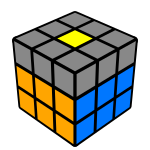 Until this point we could work intuitively without any algorithm to memorize, but in this stage when we're solving the second layer (first two layers - F2L) of the Rubik's Cube people usually get stuck because there are too many moves to foresee in order to complete this step.
You'll have to learn two algorithms which bring the edge piece from the yellow layer to the second layer without messing up the white face already solved. Until this point we held the cube with the white center facing up, now turn it upside down to let you review the puzzle better.
The Right and Left algorithms:
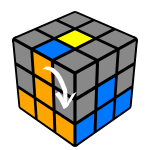
U R U' R' U' F' U F
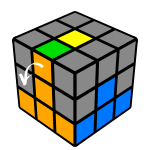
U' L' U L U F U' F'
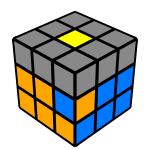
Use the right algorithm to bring the piece to the top layer
We are going to call these the Right and Left algorithms. As you can see on the animations these bring the front-up edge to the right-front or left-front positions.
Right algorithm
Left algorithm
Wrong orientation
When the edge piece is on the right spot but oriented wrong or it's not in the upper layer you'll have fix it in two steps, first it needs to be taken to the top of the cube. In the example below we use the Right algorithm twice.
You can probably learn the beginner's method and master it within a week which should allow you to solve the cube in about a minute. If you practice a lot you can probably solve it within 50-55 seconds if you get lucky with your shuffle.
Hilarious.
He has used the algorithms to solve the cube multiple times. Maybe when he's a little older I'll introduce him to the other algorithms you have mntioned
I'm suspecting sticker removal by a former owner as this cube was found in my office. Should you always be able to use the above algorithms for centre layer?
I can now solve the whole cube in about 1 minute.
Remember this, ''Hard work, pays off.''
I am facing the problem here... please
I think back to when I was first learning this, my favorite solve method that has helped to solve many other cubes. (4x4, 6x6 and larger #x#, it helps with a Megaminx and larger. This solve method also helps with so many other shape modifications.)
First confusion I see and understand is how you hold the cube. first when you look at the entire Cube it is made up of several different colored cubelets that eventually you want to line up and group together so that all six sides of the cube match. every algorithm is focusing on one Cubelet at a time.
With the entire bottom face solved and now you have put your solved face upside down you will notice that all around the cube all the colors will match their side if this is not the case, you'll need to correctly.
Also with the bottom face completely solved when done correctly you will see that the solved bottom layer will have a corresponding Center.
next search the cube 4 A cubelet that needs to move to the right face or the right side of your Cube.
once you find that turn that so that Center cubelet, which I refer to as the target cubelet, is directly on top of the center matching color on your right hand side the color that is currently on the top layer will be moved to the right face.
This will be facing you and will be referred to as the front face.
you will not rotate the cube away from your current front or home face.
That said, moving to the Target "cubelet" to the right, hold the cube with that color facing you.
That is your "front face".
The cube will never be turned/rotated, consider that front face as home.
Then do the algorithm.
Turn the single top layer to the left, there's your U move.
Notice that the piece or what's been called a "cubelet", will still be on the top layer but instead of being on your front face or your home face it will be on the left face.
That part is done for now next, while still facing your home face turn the right layer so the bottom layer's 3 cubelets are facing you.
This I'd the R move (If you stop and look at your cube, it may be confusing.
) Next move in this is U' also known as up inverted, really you're turning that top layer from your first move back to your home face, the front face.
Now you will next turn the right layer almost as turning it toward you.
This is the R' right inverted.
You're almost there! it's very important not to look at the cube at this point.
but take a minute to notice that you did the first two moves the up and the right and then did the opposite of those moves with up inverted right inverted.
the next will be another up layer inverted.
this will place the Target cubelet on the right face.
still looking at your home face, turn that entire layer counter clockwise this is your front inverted move.
Now turn the top layer to the left that's known as you're up move.
You may notice that your target cubelet is now wind up with the same color as your home face Center cubelet.
The final move and as algorithm is to return the front face by turning it clockwise.
This move will return all of the cubelets from the bottom face back to the bottom where they belong and it will place your target cubelet on the right hand side of your front face and if done correctly should line up with the color that's on your right face.
Good luck and happy cubing