Rubik's Cube Solver
Calculate the solution for your scrambled Rubik's Cube in 20 steps.
Input the colors of your cube and the program will guide you through the solution.
rotations
image


What Can You Do With This Rubik Solver?
 Solve your scrambled Rubik's Cube - if you have a cube you couldn't solve for a long time this program will help you.
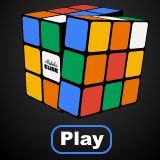
- Play online - hit the scramble button and try to solve it in your web browser dragging the layers with your mouse or using the allocated buttons or your keyboard.
- Generate Rubik's Cube images - you can save the scrambled cube as a picture clicking on the 'Generate image' checkbox. Many formats and settings are available.
- Save a scramble - Set up a scramble pattern and press the Solve button. Your scheme will be encoded in the link of the solution page which you can open later.
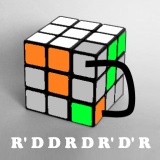
- Discover the cube - learn notation, try patterns etc.
This program finds the solution in approximately 20 steps (God's algorithm) in most cases. For this your setup needs to be a valid configuration, using the western color scheme.
The solver uses client side scripts and is functional in most common web browsers without any additional extension. If the program doesn't respond please make sure that scripts are enabled on your browser. For iPhone, Android or other mobile users with a small screen resolution the program automatically switches to a smaller view to fit your device. The site uses cookies to enhance the user experience.
How to use the Rubik's Cube Solver?
You have to set the colors of your scrambled cube, press the Solve button and the program will show you the steps (rotations) needed to get it fixed. There are three different views to choose from, select the one you like the most.
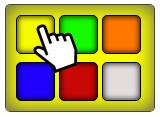
The program is working with any color scheme which uses these six colors: white, red, blue, orange, green, and yellow. It doesn't matter if the colors are not in this order on your cube because the program automatically determines the color settings according to the middle pieces. Unfortunately only a layer-by-layer solution is available if your cube is not using the classic color scheme.
Set up a scramble
There are many ways to set up the scrambled cube. You can pick a color on the palette, then paste it on one of the fields. You can also do multiple clicks on a field to change its color. Generate a random scramble, and reset the cube to the solved position with the Reset button. Apply any basic rotation by clicking on one of the permutation buttons or by pressing the corresponding buttons on your keyboard: R, L, U, D, F and B. Drag a field with your mouse and rotate in the desired direction. Under the permutation buttons you can see the description of each button to help you understand what they mean.
Following the solution steps
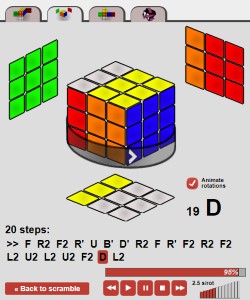 After you set a valid scramble you can try to solve it online using the rotation buttons, or click the Solve button and the program will show you the solution. Please be patient because depending on your internet connection and computer configuration this can take a while. When the program finds the steps it might ask you to reorient the puzzle in your hands because it will always solve the cube starting from the bottom layer.
Please double check your puzzle when the solver says Invalid scramble. You might have swapped one or more pieces. Go back to the scramble page and try to find the problem. If the program throws this error many times in a row then your cube might have been assembled in an unsolvable configuration. In this case you have to take it apart and build it in the solved state.
After the orientation is right go ahead and apply the rotations given by the online Rubik's Cube solver. Respect the initial orientation, and make all the rotations right because if you miss one or make a wrong turn you end up with a scrambled cube. Be careful with the double turns which mean a 180 degree turn of a face. These are marked with x2. You can play back the solution with the desired speed or click through the steps one by one any time you want. If you don't understand what the letters mean then click on them to see the illustration. For this to work you have to activate the Animate rotations feature with the allocated checkbox. You might also find useful the Rubik's Cube Notation page where you can find a detailed explanation about what the letters mean in the solution algorithm. A YouTube video is also available to demonstrate the operation of this program.
After you successfully solved your puzzle go back to scramble a new cube.
Image generator
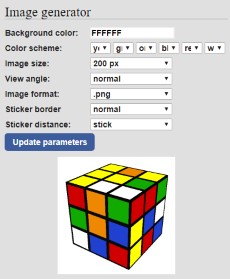 The online Rubik's Cube image generator could create jpg, png and gif pictures but now its simplified version is creating only .svg files. Another useful feature of this online application is that you can save the scrambled cube as an image in svg format with a few clicks. To give this a try click the Generate Image button. Once the picture is generated you have to close and open it again if you make changes to the configuration.
For animated interactive 3D cube widgets please visit this page.
Please contact us or use the comment section if you have any suggestion.
Your feedback is much appreciated :)
rubiks-cube-solver.com/solution.php?cube=042111...
this thing is useless
The first two layers are solved and there's one yellow piece facing upwards. There should be a cross, a line, an L shape or just the middle piece:
If you see invalid scramble then you need to take out the wrong piece and put it back correctly. Flip an edge piece in this case (it doesn't matter which one).
I already knew how to solve all the different sized cubes. I just wanted to see if this actually worked.
make different cube solving?
eg: 2x2 cube, 4x4,5x5 gear cube, megamix...?