 Ruwix
Ruwix 
Online 4x4 Rubik's Cube Solver - Rubik's Revenge
Use this free online 4x4 cube solver to find the solution of any scrambled Rubik's Revenge. Set the colors of your puzzle, press the Solve button and follow the moves on the screen. No download required.
The 4x4x4 is the big brother of the Rubik's Cube: it has no fixed centers, every edge is split into two pieces, and it can show two "parity" positions that never happen on a 3x3. That makes it a tough nut even for people who solve the classic cube. This program takes the thinking out of it: it solves the cube the same way a human does with the reduction method, so you can follow the steps and learn from them at the same time.
How To Use The 4x4 Solver?
1. Pick A View
Use the tabs above the cube to switch between the 3D view and the unfolded Flat view, which shows all six faces at once. In the 3D view you can rotate the cube with the arrow buttons under it (or the arrow keys), make the front faces transparent, or lift the hidden faces up with the Float button.
2. Set Up The Scrambled Cube
Hold your cube with the white center on top and the green center facing you, the way the program shows it in the starting position, then copy the colors:
- 🎨 Pick a color on the palette and click the stickers one by one.
- 🖱️ Or click a sticker repeatedly, without a color selected, to cycle through the six colors.
- ⌨️ Or type a scramble algorithm into the box and press the checkmark.
On a 4x4 the centers are not fixed, so pay attention to the color scheme: white is opposite yellow, green is opposite blue, and orange is opposite red, with white on top and green in front the red center is on the right. The program checks every piece and tells you if two stickers are swapped or a color is used too many times.
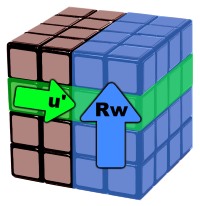
4x4 notation
You can also turn the layers with the buttons. The first two rows turn the outer layers exactly like on a 3x3:
FRULBD
Capital letters mean a clockwise turn of the Front, Right, Up, Left, Back and Down face.
🔄 Counterclockwise turns are marked by an apostrophe '
✌️ Double turns (180°) are marked by 2.
The two blue rows are the wide turns, the extra moves of the big cube. Rw turns the right face together with the inner layer next to it, two layers at once, in the direction of R. In the algorithm box you can type Rw or simply a lowercase r, both mean the same wide turn (this is the official WCA notation). Whole-cube rotations x, y and z are accepted too.
R R' R2 Rw Rw' Rw2
Hit Scramble to let the program mix the cube with a random 45-move scramble, Reset to go back to the solved position, or Blank to erase the colors.
3. Calculate The Solution
When the colors on the screen match your cube, press Solve. The calculation takes a few seconds and the solution appears right under the cube. Play it with the ▶ button and set the speed with the slider, or click through the moves one by one. Click any move in the list to jump there. The stickers of the layer that turns are marked with little arrows, the 2× sign means a double turn and wide means two layers together.
Below the cube you'll also find a picture of every step from the start to the solved cube, with the moving layer highlighted. Click a picture to show that step on the big cube.
How Does It Solve The 4x4?
The program uses the reduction method, the same one taught in our 4x4 tutorial. The solution is grouped into these stages so you can see what each part does:
- Centers - it builds the six 2x2 center blocks, white first, then yellow, then the four sides in the right color scheme.
- Edge pairing - the 24 wing pieces are joined into 12 solid edges using short setup moves and the classic edge pairing algorithms.
- OLL parity - if an odd number of edges would end up flipped, the 4x4-only parity algorithm fixes it before the 3x3 stage.
- PLL parity - if two edges would need to swap, the second parity algorithm takes care of it.
- 3x3 stage - now the puzzle behaves like a Rubik's Cube, and the Kociemba two-phase algorithm finishes it in about 20 outer-layer moves.

The two parity cases
A full solution is usually 120 to 170 moves long. That sounds like a lot compared to the 20 moves of the 3x3 solver, but the 4x4 has about 7.4×1045 positions and no computer can search them all. The reduction method finds a solution a human can follow in a few seconds, and every stage ends in a position you recognize from the tutorial.
Impossible Scramble Error
If the program says that your scramble is impossible, go back and check the colors. The most common mistakes are a corner entered with the wrong colors, two stickers swapped on a side face, or a wrong color scheme (for example red on the left instead of orange). On the 4x4 the centers can be built in a wrong arrangement: the four side centers must follow the order green, red, blue, orange when you turn the cube to the left.
If every sticker is right and the error stays, your cube was probably taken apart and reassembled in an unsolvable state: a twisted corner is the usual case. Take out the piece and put it back correctly, then try again.
Frequently Asked Questions
Is this the shortest solution?
No. The program finds a solution a human can follow, not the shortest one. Optimal 4x4 solutions are not known in general; the shortest known solutions for random scrambles are around 40 moves and take hours of computing time.
Why do I see parity even though I never took the cube apart?
Parity on the 4x4 is normal. It is a consequence of the hidden inner layers: a position that looks like a "flipped edge" or "two swapped edges" on the reduced cube is perfectly legal on the 4x4. The program recognizes both cases and fixes them with the parity algorithms.
Does it work with other color schemes?
The solver expects the standard scheme: white opposite yellow, green opposite blue, red opposite orange. If your cube has different colors, just use the closest ones: think of your odd color as the one it replaces and the solution will be correct.
Learn To Solve The 4x4 Yourself
If you'd rather solve it with your own hands, read the 4x4 Rubik's Revenge tutorial. It explains the centers, the edge pairing and the parity algorithms with pictures, and once you know the 3x3 it only takes an afternoon. You can also practice with the online 4x4 simulator or make pretty patterns on your cube.
Other Puzzle Solvers
Beside the 4x4 we have online solvers for the 3x3 Rubik's Cube, the 2x2 Pocket Cube and the Pyraminx.
Thank you for using our online tool! We hope it helps you solve your cube!