- 2x2x2 pocket cube
- 3x3x3 Rubik's Cube
- 4x4x4 Rubik's Revenge
- 5x5x5 Professor's Cube
- Big Cube
- Picture Cube
- Ghost Cube
- 3x3x3 Cube Heads
- Mirror Cube
- Fisher Cube
- Axis Cube
- Mastermorphix
- Windmill Cube
- Pandora Cube
- Penrose Cube
- Globe puzzle
- Bandaged Cube
- Siamese Cube
- Void Cube
- Mixup Cube
- QJ Dodecahedron
- Floppy Cube
- 2x2x3 tower cube
- 2x2x4 tower cube
- Domino Cube
- 3x3x4 cuboid
- Square-1
- Pyramorphix
- Pyraminx
- Helicopter Cube
- Curvy Copter
- Clover Cube
- Skewb
- Skewb Ultimate
- Ivy Cube
- Rex Cube
- Dino Cube
- Redi Cube
- Face-Turning Octahedron
- Kilominx
- Master Kilominx
- Megaminx
- Pyraminx Crystal
- Starminx
- Rubik's Clock
- 4D Rubik's Cube
- Hungarian Rings
- Sliding 15 Puzzle
- Embed widgets
Algorithm notation. The Axis Cube is read on its mechanism layers: U D R L F B are the six layers the u d r l f b keys turn, and because the cuts run diagonally every quarter turn shape-shifts the puzzle. M E S are the middle slices (M follows L, E follows D, S follows F), Rw or r turns a face with its slice, and x y z rotate the whole cube. A plain letter is clockwise seen from outside, an apostrophe is counter-clockwise and 2 is a half turn. Brackets repeat or invert a group: (R U R' U')x3 or (R U R' U')3 plays the trigger three times and (R U)' plays its inverse. The second input loads an algorithm into the player under the cube, played on the cube as it stands (set up a scramble with the first input): step through it with the buttons, press play, or click a move to jump there.
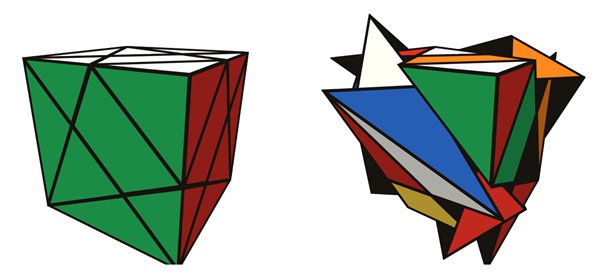
Online Axis Cube Simulator
Free Axis Cube simulator: a 3x3 whose cuts run diagonally, so every turn changes the shape. Scramble, time your solves and step through 3x3 algorithms.
Axis Cube simulator: every turn changes the shape
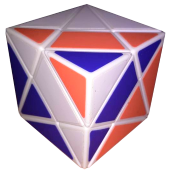
The Axis Cube looks like a plain cube when solved, but its internal 3x3x3 mechanism is tilted inside the shell. In this simulator the cutting grid is rotated 60 degrees around the diagonal that runs from one corner of the cube to the opposite corner. As a result, none of the six mechanism layers lines up with a face of the shell, and every quarter turn, of any layer, changes the outline of the puzzle. That is the big difference from the related Fisher and Windmill cubes, where the top and bottom layers still turn without shape-shifting.
Why it is still a 3x3 underneath
The tilted grid is a perfectly ordinary 3x3x3 core with six centres, twelve edges and eight corners. Only the outer shape of the pieces differs. So everything you know about a normal cube applies: a centre only spins in place when its layer turns, edges and corners keep their roles, and every 3x3 algorithm works when you hold the puzzle the right way. The challenge is recognition, because the pieces are irregular slices of the shell, some stickers are small, and a piece does not always show as many stickers as its type would on a normal cube.
A practical solving approach
- Find the centres first. Turn a layer and watch which piece rotates without moving: that is the centre of that layer. Knowing all six tells you which layer is which.
- Build the first layer around one centre, piece by piece, checking that each piece fits both by colour and by shape.
- Insert the middle-layer edges with the usual 3x3 sequences.
- Finish the last layer with orientation and permutation algorithms. Take your time recognising cases; the shape often looks wrong even when the stickers are right.
If any of these steps is new to you, practise them on a regular cube with the beginner's method first, then come back to the Axis Cube.
How to use this simulator
- Drag a layer to turn it and drag the background to orbit. The keys u e d r l f b m s turn layers using standard move notation; hold Shift to reverse.
- Scramble mixes the puzzle with random moves, Undo takes back a move and Reset returns to the solved cube.
- The Start button or the Space bar starts and stops the timer. Scrambling resets the timer but does not start it.
- Type an algorithm to apply it, or load it into the player below the cube to step through it one move at a time. The demos, such as six repetitions of
R U R' U'that bring the cube back to the start, show how even a wildly deformed Axis Cube returns to a cube. - The link and embed boxes let you share a scramble or put the puzzle on another page.
Is the Axis Cube harder than the Rubik's Cube?
The moves are exactly the same, so it is not harder in theory. In practice it is much harder to read, because the shape changes on every turn and pieces of the same type can look quite different. Most of the extra effort goes into recognising where each piece belongs.
How does it compare with the Fisher and Windmill cubes?
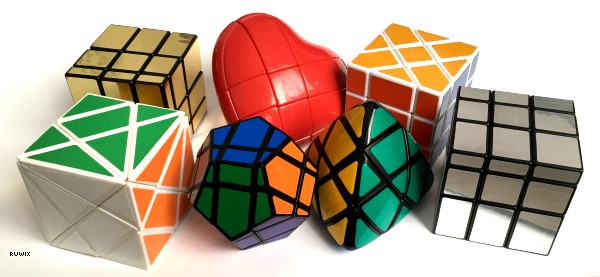
All three are 3x3s with a rotated grid. The Fisher Cube and the Windmill Cube rotate it only around the vertical axis, so U and D turns keep the shape. If the Axis Cube feels overwhelming, try one of those first.
When does the simulator call it solved?
When the puzzle is a cube again with a single colour on every face. The status line then shows your move count.