- 2x2x2 pocket cube
- 3x3x3 Rubik's Cube
- 4x4x4 Rubik's Revenge
- 5x5x5 Professor's Cube
- Big Cube
- Picture Cube
- Ghost Cube
- 3x3x3 Cube Heads
- Mirror Cube
- Fisher Cube
- Axis Cube
- Mastermorphix
- Windmill Cube
- Pandora Cube
- Penrose Cube
- Globe puzzle
- Bandaged Cube
- Siamese Cube
- Void Cube
- Mixup Cube
- QJ Dodecahedron
- Floppy Cube
- 2x2x3 tower cube
- 2x2x4 tower cube
- Domino Cube
- 3x3x4 cuboid
- Square-1
- Pyramorphix
- Pyraminx
- Helicopter Cube
- Curvy Copter
- Clover Cube
- Skewb
- Skewb Ultimate
- Ivy Cube
- Rex Cube
- Dino Cube
- Redi Cube
- Face-Turning Octahedron
- Kilominx
- Master Kilominx
- Megaminx
- Pyraminx Crystal
- Starminx
- Rubik's Clock
- 4D Rubik's Cube
- Hungarian Rings
- Sliding 15 Puzzle
- Embed widgets
Algorithm notation. The Curvy Copter turns around its edges, so its notation names edges rather than faces. An edge move is named by the two faces that meet at that edge: UF UR UB UL FR FL BR BL DF DR DB DL. Each move flips that edge 180 degrees, so no 2 or prime is needed, and the letter order does not matter (FU equals UF). Brackets repeat or invert a group: (UF UR)x3 or (UF UR)3 plays the pair three times and (UF UR)' plays its inverse. Jumbling moves, where a layer stops half way, are not modelled. The second input loads an algorithm into the player under the puzzle, played on the puzzle as it stands (set up a scramble with the first input): step through it with the buttons, press play, or click a move to jump there.
Online Curvy Copter Simulator
Free Curvy Copter simulator in 3D: flip the curved edge wedges, scramble, time your solves and step through algorithms move by move in your browser.
Curvy Copter Simulator: Edge Turns With Curved Cuts
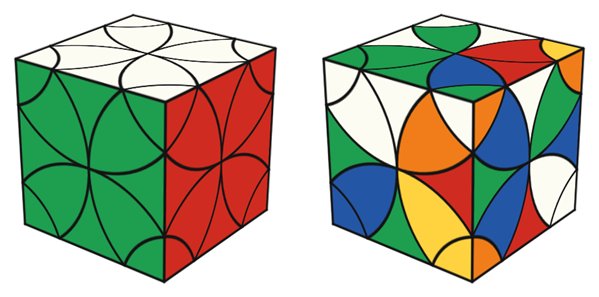
The Curvy Copter is the Helicopter Cube's curvy relative. It was designed by the Dutch puzzle designer Tom van der Zanden, who announced it on the Twisty Puzzles forum in February 2010, and Meffert's began mass-producing it in 2011. Like the Helicopter Cube it turns around its twelve edges, but the cuts are curved, so each edge piece shows on the surface. A solved cube has 8 corners, 12 edges and 24 petal-shaped centres, four on each face.
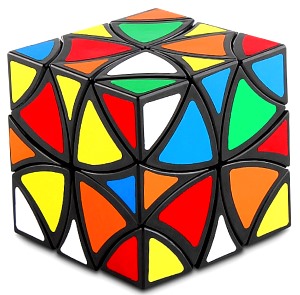
Those visible edges change the solve: every 180-degree flip turns its edge piece around, so on top of placing the pieces you also have to keep the edges facing the right way. This Curvy Copter simulator is a convenient place to learn that without wearing out a real puzzle.
Practising with the simulator
- Drag a sticker toward an edge to flip that wedge, and drag the background to orbit the cube. The QWER, ASDF and ZXCV keys flip one edge each.
- Press Scramble for a random state. The timer resets but waits for you: start and stop it with the Start button or the Space bar, so inspection is up to you.
- Undo takes back a move and Reset restores the solved cube, handy when you are testing a sequence.
- Type an algorithm and press Apply, or load it into the player to step forward and back one move at a time. The demo algorithms below the notation, such as the edge commutator
UF UR UF' UR', are good first experiments. - The link and embed boxes save a scramble and algorithm as a URL or an iframe, so you can share a position with a friend.
How to approach a solve
The Ruwix Curvy Copter tutorial uses a layer method that builds on the Helicopter Cube:
- Solve the centres of one face, then the edges around them, using the edges as pivots.
- Bring each first-layer corner under its spot and insert it, flipping its edge first if it is backwards.
- Match the remaining centres in pairs and flip them into place, checking that the edge between each pair is oriented correctly.
- Finish the corners with the same kind of algorithms as on the Helicopter Cube, fixing any edges they flip.
As on the Helicopter Cube, the petals stay in fixed groups when you only make 180-degree flips. If a petal will not reach the spot you want, it is in the wrong group for that spot, so pick a different petal of the same colour. Short commutators like the demo above are the main tool for the last few pieces.
What is jumbling on the Curvy Copter?
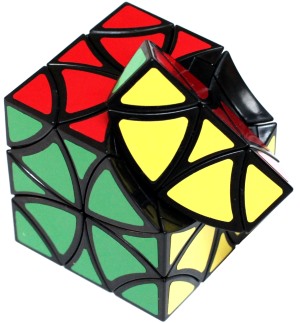
On the physical puzzle you can turn an edge part way and then turn a neighbouring cut. This swaps pieces into places they cannot reach with normal flips and makes the cube change shape. The simulator plays the standard non-jumbling flips only.
Is it harder than the Helicopter Cube?
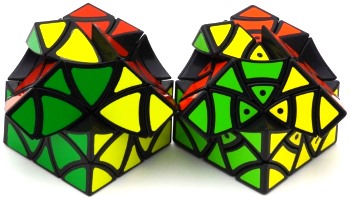
A little, mainly because of the extra edges to orient. If you are new to edge-turning cubes, try the Helicopter Cube simulator first, then come back. For a further step, the Clover Cube uses the same edge moves with different cuts.