- 2x2x2 pocket cube
- 3x3x3 Rubik's Cube
- 4x4x4 Rubik's Revenge
- 5x5x5 Professor's Cube
- Big Cube
- Picture Cube
- Ghost Cube
- 3x3x3 Cube Heads
- Mirror Cube
- Fisher Cube
- Axis Cube
- Mastermorphix
- Windmill Cube
- Pandora Cube
- Penrose Cube
- Globe puzzle
- Bandaged Cube
- Siamese Cube
- Void Cube
- Mixup Cube
- QJ Dodecahedron
- Floppy Cube
- 2x2x3 tower cube
- 2x2x4 tower cube
- Domino Cube
- 3x3x4 cuboid
- Square-1
- Pyramorphix
- Pyraminx
- Helicopter Cube
- Curvy Copter
- Clover Cube
- Skewb
- Skewb Ultimate
- Ivy Cube
- Rex Cube
- Dino Cube
- Redi Cube
- Face-Turning Octahedron
- Kilominx
- Master Kilominx
- Megaminx
- Pyraminx Crystal
- Starminx
- Rubik's Clock
- 4D Rubik's Cube
- Hungarian Rings
- Sliding 15 Puzzle
- Embed widgets
Algorithm notation. The Mixup Cube, designed by Oskar van Deventer and made by WitEden (the idea goes back to a 1985 patent by Sergey Makarov), is a shape-shifting puzzle: its middle slices can stop every 45 degrees. Each middle ring holds four centres and four edges, and a 45-degree slice turn moves every centre of that ring into an edge slot and every edge into a centre slot, so the 18 centres and edges get mixed all over the cube. The pieces keep their shape: an edge in a centre slot stands up as a ridge above the face, and a centre in an edge slot lies diagonally as a bevel across the cube edge. A piece tilted so that it lies across a cut blocks that layer until you turn it back. U D L R F B turn a face a quarter turn clockwise as you look at it, an apostrophe (R') turns it counter-clockwise and a 2 (R2) a half turn, and a w or a lowercase letter (Rw or r) turns two layers. M E S are the middle slices turned 90 degrees (M follows L, E follows D, S follows F), and m e s are the same slices turned 45 degrees - the Mixup move - so m2 equals M. x y z rotate the whole cube. A group in brackets repeats or inverts: (m U2 m' U2)x3 or (m U2 m' U2)3 plays it three times and (R m)' plays its inverse. On the keyboard M E S give the 45-degree slice turns and Shift reverses any key. The second input loads an algorithm into the player under the cube, played on the cube as it stands (set up a scramble with the first input): step through it with the buttons, press play, or click a move to jump there.
Online Mixup Cube Simulator
Free Mixup Cube simulator: turn the middle slices 45 degrees so centres and edges swap places and the cube changes shape. Practise in 3-D with timer and demos.
Mixup Cube Simulator: When Centres Become Edges
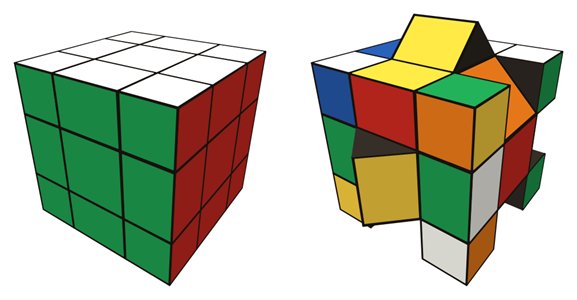
The Mixup Cube looks like a 3x3x3, but its three middle slices can stop every 45 degrees instead of every 90. After such a half-quarter turn the pieces of that ring sit between their usual slots, and the outer layers can turn in a way no ordinary cube allows: centres travel into edge positions and edges into centre positions. Oskar van Deventer designed the mass-produced version, made by WitEden, and he credits the original idea to a 1985 patent by Sergey Makarov.
How it differs from a Rubik's Cube
On a 3x3 the six centres never leave their faces, which makes them a fixed colour reference. On the Mixup Cube the six centres and twelve edges form one big group of eighteen pieces that can be mixed freely. While pieces are out of place, the cube changes shape like a 3x3 shape mod: an edge sitting in a centre slot stands up as a ridge above the face, and a centre in an edge slot lies across the cube edge as a diagonal bevel. A piece left tilted across a cut also blocks that layer, so the simulator, like the real puzzle, refuses the turn and tells you to straighten the piece first.
Using the simulator
- Drag a piece to turn its layer: faces snap every 90 degrees, middle slices every 45. Drag the background to orbit the cube.
- On the keyboard U D L R F B turn faces, M E S give the 45-degree slice turns and X Y Z rotate the cube; Shift reverses any key.
- In typed notation, M E S are 90-degree slice turns and lowercase m e s are the 45-degree Mixup moves, so
m2equalsM. - Scramble, Undo and Reset work as usual, and the Start/Stop timer (button or Space bar) is reset by a scramble but not started, so you can inspect the shape first.
- The example list shows the key tricks, for instance
m U2 m' U2, which swaps the U and B centres along with two edges. Load any sequence into the player to watch it one move at a time, and use the link and embed boxes to share it.
Solving approach
A common plan has three stages. First, restore the cube shape: bring every centre back into a centre slot and every edge into an edge slot, turning slices back so nothing is left tilted. Second, put the centres on their correct faces. Sequences like m U2 m' U2 swap two centres, and watching the demo in the step-by-step player shows exactly how the slice carries a centre out and back. Third, solve the rest like a normal 3x3, for example with the beginner's method.
Expect some cases that a 3x3 cannot produce. One owner's review lists three: centres that come out swapped once the cube is back in shape, a single flipped edge in the last layer and two last-layer edges swapped on their own. Since ordinary 90-degree turns cannot solve these, every fix needs the 45-degree slice moves, which is why it pays to practise those on the simulator before attempting the physical puzzle. For a plain reference, try the same moves on the 3x3 simulator.
Who designed the Mixup Cube?
Oskar van Deventer designed the version mass-produced by WitEden. He points to a 1985 patent by Sergey Makarov as the origin of the idea.
Why can't I turn a layer?
A tilted piece is lying across that layer's cut. Turn the middle slice that holds it by 45 degrees so the piece lies flat again, and the layer will move.
Is the Mixup Cube good for beginners?
It is best after you can solve a 3x3. The extra stages build on normal cube skills, and the simulator's Undo button makes experimenting with 45-degree moves painless.