- 2x2x2 pocket cube
- 3x3x3 Rubik's Cube
- 4x4x4 Rubik's Revenge
- 5x5x5 Professor's Cube
- Big Cube
- Picture Cube
- Ghost Cube
- 3x3x3 Cube Heads
- Mirror Cube
- Fisher Cube
- Axis Cube
- Mastermorphix
- Windmill Cube
- Pandora Cube
- Penrose Cube
- Globe puzzle
- Bandaged Cube
- Siamese Cube
- Void Cube
- Mixup Cube
- QJ Dodecahedron
- Floppy Cube
- 2x2x3 tower cube
- 2x2x4 tower cube
- Domino Cube
- 3x3x4 cuboid
- Square-1
- Pyramorphix
- Pyraminx
- Helicopter Cube
- Curvy Copter
- Clover Cube
- Skewb
- Skewb Ultimate
- Ivy Cube
- Rex Cube
- Dino Cube
- Redi Cube
- Face-Turning Octahedron
- Kilominx
- Master Kilominx
- Megaminx
- Pyraminx Crystal
- Starminx
- Rubik's Clock
- 4D Rubik's Cube
- Hungarian Rings
- Sliding 15 Puzzle
- Embed widgets
Pictures
Upload one image for the whole cube, or one per face. Square images look best. Pictures stay in your browser - nothing is uploaded anywhere. Changing them never resets the puzzle.
Algorithm notation. The picture cube is a normal 3x3x3, so the input reads standard notation. U D L R F B turn the up, down, left, right, front and back face a quarter turn clockwise as you look at that face; an apostrophe (R') turns it counter-clockwise and a 2 (R2) turns it 180 degrees. M E S are the middle slices (M follows L, E follows D, S follows F), a w or a lowercase letter (Rw or r) turns two layers together, and x y z rotate the whole puzzle. A group in brackets repeats or inverts: (R U R' U')x3 or (R U R' U')3 plays the trigger three times and (R U)' plays its inverse. Because the tiles are pictures, a centre that has been twisted counts as unsolved, which is why slice sequences such as M2 E2 S2 matter here. The second input loads an algorithm into the player under the cube, played on the cube as it stands (set up a scramble with the first input): step through it with the buttons, press play, or click a move to jump there.
Online Picture Cube Simulator
Free Picture Cube simulator: put your own photos or the Earth on a 3x3 cube, scramble it and solve the image back together, centre twists and all.
Picture Cube simulator: put your own photos on a 3x3
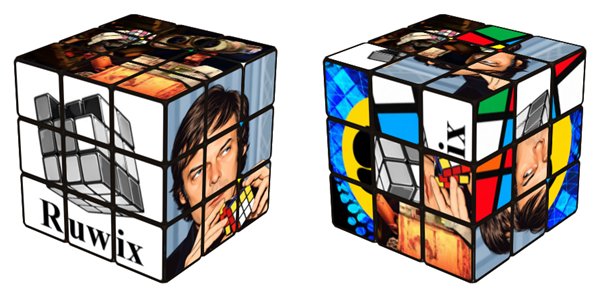
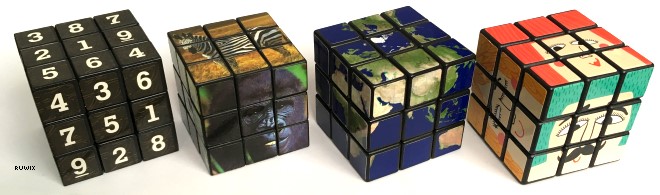
A picture cube is a normal 3x3x3 Rubik's Cube whose stickers form images instead of plain colours. It combines a twisty puzzle with a jigsaw: every sticker is one ninth of a picture, so it only looks right when each tile is in its place and the right way up. Many picture cubes are made as promotional items, and the Earth Cube, with a map of the globe wrapped around it, is a well-known example. This simulator lets you build one from your own images and solve it in the browser.
Adding your pictures
Open the Pictures panel above the cube. Two ready-made sets are included: the default picture cube and an Earth cube made from a satellite image that runs continuously across every edge. To use your own photos, upload one image for the whole cube or a separate image for each of the six faces. Square images look best. Your files stay in your browser and are not uploaded anywhere, and swapping pictures never resets the puzzle, so you can even change them in the middle of a solve.
Why centre orientation matters
On a plain-coloured cube a centre piece can be turned any way and nobody notices. With pictures, a centre that has been rotated 90 or 180 degrees is plainly wrong, so a picture cube behaves like a supercube where every piece has an exact position and orientation. The simulator only reports the cube as solved when every tile, centres included, is back the right way up. It accepts any orientation of the whole cube, though, so you can hold it however you like.
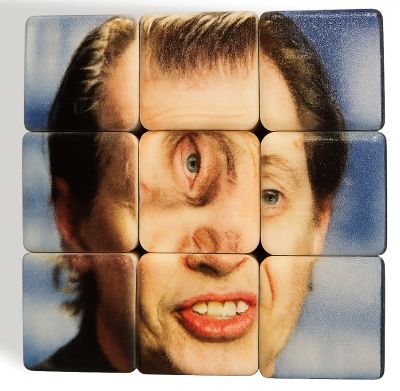
You cannot have just one twisted centre on an otherwise solved cube; if one is off, at least one other centre is off too. Two useful fixes:
(U R L U2 R' L')x2turns the top centre 180 degrees and leaves everything else in place. It is listed in the demos as the U centre half turn.- For centres turned 90 degrees, the Ruwix guide to picture cubes and centre orientation has algorithms that twist two centres at once.
The easiest habit is to watch the centres from the start: when you solve the first-layer edges, line each one up with the picture on its centre, and fewer centres will need fixing at the end.
Practising with the simulator
Drag a sticker to turn a layer and drag the background to orbit the cube. The keyboard uses standard notation: U R F D L B for faces, M E S for slices and X Y Z for rotations, with Shift for counter-clockwise. Scramble mixes the cube, Undo steps back and Reset restores the picture. The timer starts and stops with the Start button or Space; a scramble resets it but does not start it. Use the algorithm input to apply a sequence, or load it into the player to step through it and see how the picture tiles travel. If you are new to cubing, learn the beginner's method first; it works here unchanged, apart from the centre check.
Can I share my picture cube?
The link and embed boxes share your scramble and algorithm. Uploaded photos stay on your device, so they are not included in the link; whoever opens it sees the built-in pictures.
Is a picture cube harder than a normal Rubik's Cube?
Slightly. The moves are the same, but you have to fix centre orientation, and busy photos can make it harder to tell similar tiles apart. Pictures with clear shapes and distinct areas are easier to solve than, say, a photo of the sky.