- 2x2x2 pocket cube
- 3x3x3 Rubik's Cube
- 4x4x4 Rubik's Revenge
- 5x5x5 Professor's Cube
- Big Cube
- Picture Cube
- Ghost Cube
- 3x3x3 Cube Heads
- Mirror Cube
- Fisher Cube
- Axis Cube
- Mastermorphix
- Windmill Cube
- Pandora Cube
- Penrose Cube
- Globe puzzle
- Bandaged Cube
- Siamese Cube
- Void Cube
- Mixup Cube
- QJ Dodecahedron
- Floppy Cube
- 2x2x3 tower cube
- 2x2x4 tower cube
- Domino Cube
- 3x3x4 cuboid
- Square-1
- Pyramorphix
- Pyraminx
- Helicopter Cube
- Curvy Copter
- Clover Cube
- Skewb
- Skewb Ultimate
- Ivy Cube
- Rex Cube
- Dino Cube
- Redi Cube
- Face-Turning Octahedron
- Kilominx
- Master Kilominx
- Megaminx
- Pyraminx Crystal
- Starminx
- Rubik's Clock
- 4D Rubik's Cube
- Hungarian Rings
- Sliding 15 Puzzle
- Embed widgets
Algorithm notation. The bandaged cube reads standard notation, but the glue decides what really moves. R L U D F B grip a face, M E S a middle slice, and x y z turn the whole cube; an apostrophe inverts a move and 2 doubles it. A face that sits next to a glued block turns as a wide move, so R becomes Rw on the move list, and a grip that would drag the whole cube along is blocked and reported by name, in which case nothing is applied. Brackets repeat or invert a group: (R2 U2)x3 or (R2 U2)3 plays the pair three times and (R U)' plays its inverse. The second input loads an algorithm into the player under the cube, played on the cube as it stands (set up a scramble with the first input): step through it with the buttons, press play, or click a move to jump there.
Online Bandaged Cube Simulator
Free Bandaged Cube simulator with five presets: Fused Cube, 1x2x3 and 2x2x3 blocks, Meffert's Bicube and the 4x4 AI Cube. Glued blocks turn along in 3-D.
Bandaged Cube Simulator: Five Glued-Block Puzzles
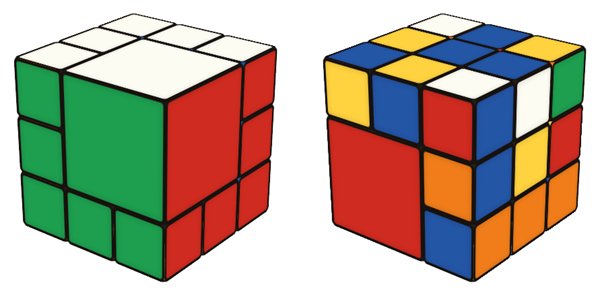
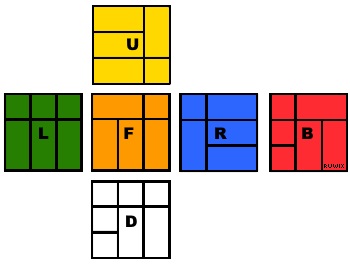
A bandaged cube is a Rubik's Cube with some neighbouring pieces glued together into larger blocks. The blocks can never separate, so any turn that would split one is impossible. A puzzle that is mechanically a 3x3x3 or 4x4x4 suddenly allows far fewer moves, many familiar algorithms stop working, and solving becomes a matter of planning around the glue. This simulator collects five classic layouts in the dropdown above the cube.
- 3x3 Fused Cube - one 2x2x2 corner block. The three faces that cut through it can only turn as two-layer wide moves.
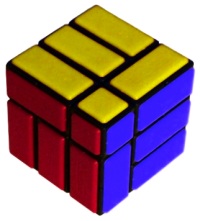
- 3x3 1x2x3 Block - a single 1x2x3 bar glued along one face.
- 3x3 Big Block 2x2x3 - a large 2x2x3 block, which leaves only a few layers free.
- 3x3 Bicube - the bandaged cube sold by Uwe Meffert. Seven corners are glued to edges as 2x1x1 bars, the other five edges are glued to face centres, and only one corner is free. From the solved state just three faces can turn.
- 4x4 AI Cube - a 4x4x4 with four non-adjacent 2x2x2 corner blocks. It mostly moves like a 2x2x2 cube, until the four unbandaged corners gather on one face and that face layer can turn on its own.
How the simulator handles the glue
When you drag a sticker, the simulator works out which pieces must move together. A face that sits next to a glued block takes the block with it, so R turns as Rw and the move list shows the wide move that really happened. In the algorithm input, a move that would drag the entire cube along is refused and named in the status line, and nothing is applied. Scrambles use legal moves only, so every scrambled position can be solved.
Practice features
- Drag the background to orbit the cube. The keys R L U D F B M E S turn layers and Shift reverses them.
- Scramble, Undo and Reset sit above the Start/Stop timer, which you control with its button or the Space bar. Scrambling resets the clock but does not start it.
- Type an algorithm and press Apply, or load it into the step-by-step player to see each turn and which blocks it drags along. The example list changes with the preset and only offers sequences that are legal on it.
- The link and embed boxes let you share a scramble or put the puzzle on your own page.
Solving tips
Forget speed and think in terms of available moves. Before each step, check which layers can turn right now; on most presets the answer changes as the blocks move. Work with short sequences built from the free layers, and when you need a piece somewhere specific, first ask how to bring a free layer next to it. On the Bicube the free corner is the key piece: its colours tell you which way to hold the puzzle, and much of the solve is about getting the glued bars into the right configuration. Jaap Scherphuis has calculated that the Bicube has 1,108,800 positions and can always be solved in at most 28 moves, so it is small enough to explore by hand. For more background and other designs, see the overview of bandaged Rubik's Cube puzzles, and for a puzzle where the glue joins two whole cubes, try the Siamese Cube.
Can every bandaged cube be solved with normal algorithms?
No. Most standard 3x3 algorithms would split a glued block somewhere, so you usually need sequences made from the layers that are free on that particular puzzle.
Why does R turn two layers?
Because the right face cannot move without the block it is glued to. The simulator turns the smallest set of layers that keeps every block in one piece and shows that move by its real name.