- 2x2x2 pocket cube
- 3x3x3 Rubik's Cube
- 4x4x4 Rubik's Revenge
- 5x5x5 Professor's Cube
- Big Cube
- Picture Cube
- Ghost Cube
- 3x3x3 Cube Heads
- Mirror Cube
- Fisher Cube
- Axis Cube
- Mastermorphix
- Windmill Cube
- Pandora Cube
- Penrose Cube
- Globe puzzle
- Bandaged Cube
- Siamese Cube
- Void Cube
- Mixup Cube
- QJ Dodecahedron
- Floppy Cube
- 2x2x3 tower cube
- 2x2x4 tower cube
- Domino Cube
- 3x3x4 cuboid
- Square-1
- Pyramorphix
- Pyraminx
- Helicopter Cube
- Curvy Copter
- Clover Cube
- Skewb
- Skewb Ultimate
- Ivy Cube
- Rex Cube
- Dino Cube
- Redi Cube
- Face-Turning Octahedron
- Kilominx
- Master Kilominx
- Megaminx
- Pyraminx Crystal
- Starminx
- Rubik's Clock
- 4D Rubik's Cube
- Hungarian Rings
- Sliding 15 Puzzle
- Embed widgets
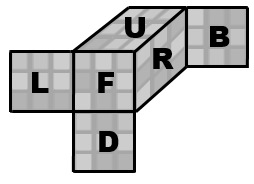
Algorithm notation. The input under the buttons reads standard Rubik's Cube notation. U D L R F B turn the up, down, left, right, front and back face a quarter turn clockwise as you look at that face; an apostrophe (R') turns it counter-clockwise and a 2 (R2) turns it 180 degrees. M E S are the middle slices (M follows L, E follows D, S follows F), a w or a lowercase letter (Rw or r) turns two layers together, and x y z rotate the whole puzzle. A group in brackets repeats or inverts: (R U R' U')x3 or (R U R' U')3 plays the trigger three times and (R U)' plays its inverse. On a bigger size picked from the menu, 2R turns the second slice from the right alone, 3Rw turns the three outer layers together, and F₂ is the Ruwix spelling of Fw, while a plain F2 is still the front face turned twice. A side with a mixed odd and even cross-section, such as the 3x3x2 Domino, only turns 180 degrees. The second input loads an algorithm into the player under the cube, played on the cube as it stands (set up a scramble with the first input): step through it with the buttons, press play, or click a move to jump there.
Online Rubik's Cube Simulator
Free online Rubik's Cube simulator in 3D: drag to turn, scramble, undo, time your solves and step through any algorithm. No download, works on mobile.
Online Rubik's Cube simulator: practise the 3x3 in your browser
The classic 3x3x3 Rubik's Cube was invented in 1974 by the Hungarian sculptor and professor of architecture Ernő Rubik. It has 43,252,003,274,489,856,000 possible positions (about 43 quintillion), yet in 2010 researchers proved that every one of them can be solved in 20 moves or fewer. This Rubik's Cube simulator gives you a full 3D cube that you turn with the mouse or a finger, so you can learn a method, test algorithms and time your solves without a physical puzzle in your hands.

How to use the simulator
- Turn a layer: press on a sticker and drag it in the direction the layer should move. Drag the empty background to orbit the cube and look at it from any side.
- Keyboard: U R F D L B turn the outer faces, M E S the middle slices and X Y Z rotate the whole cube; hold Shift for the counter-clockwise turn.
- Scramble, Undo, Reset: Scramble mixes the cube with a random sequence and shows it in the status line, Undo takes back the last move and Reset returns the cube to solved.
- Timer: use the Start/Stop button or the Space bar. Scramble sets the clock back to zero but does not start it, so you can inspect the cube first, press Space to start and press it again when you finish.
- Algorithms: type moves into the first input and press Apply to play them on the cube, for example a scramble from a competition or a pretty pattern. The second input loads an algorithm into the player under the cube, where you can step forward and back one move at a time or press play.
- Share and embed: the link box builds a URL that contains your scramble and algorithm, and the embed box gives you iframe code to put the cube on your own site or blog.
A practice routine that works
If you are just starting, solve the cube layer by layer. The Ruwix beginner's method splits the solve into seven steps: white cross, white corners, second layer, yellow cross, yellow edges, positioning the yellow corners and finally orienting them. Learn one step at a time: load the algorithm for that step into the player, watch it move by move, then press Reset or Undo and perform it yourself with the mouse or keyboard. Because the player always starts from the cube as it is, you can set up a case with the first input and replay the same algorithm on it as often as you like.
Once the beginner method is comfortable, most speedcubers move on to CFOP (Cross, F2L, OLL, PLL), the method most commonly used in speedcubing today. Here the timer becomes the main tool: scramble, inspect, solve, write down the time and repeat. Watching your times over a dozen solves tells you far more than any single result, and the move counter in the status line shows whether you are getting more efficient or just faster.
Notation in a nutshell
Every algorithm here uses standard notation: a letter turns that face clockwise as you look at it, an apostrophe means counter-clockwise and a 2 means a half turn. So R U R' U' is right side up, top to the left, right side down, top to the right: the famous trigger you will meet in almost every method. The paragraph above lists the rest, and the Rubik's Cube notation guide explains it with pictures.
Is this online Rubik's Cube free, and does it work on a phone?
Yes. It runs in any modern browser with no download, app or account. On a touch screen you swipe a sticker to turn its layer and swipe the background to rotate the view; the page does not scroll while you swipe on the cube.
Can the simulator solve the cube for me?
No, there is no automatic solver on this page. That is deliberate: it is a practice tool, and the separate Ruwix Rubik's Cube solver does that job instead. If you get lost, Undo steps back one move at a time and Reset brings back a solved cube instantly.
Can I practise other sizes?
Yes. The three size menus above the cube turn it into any cuboid from 1x1x1 to 10x10x10, and there are dedicated pages for the 2x2x2 pocket cube and the 4x4x4 Rubik's Revenge, along with dozens of other twisty puzzles in the menu at the top.