- 2x2x2 pocket cube
- 3x3x3 Rubik's Cube
- 4x4x4 Rubik's Revenge
- 5x5x5 Professor's Cube
- Big Cube
- Picture Cube
- Ghost Cube
- 3x3x3 Cube Heads
- Mirror Cube
- Fisher Cube
- Axis Cube
- Mastermorphix
- Windmill Cube
- Pandora Cube
- Penrose Cube
- Globe puzzle
- Bandaged Cube
- Siamese Cube
- Void Cube
- Mixup Cube
- QJ Dodecahedron
- Floppy Cube
- 2x2x3 tower cube
- 2x2x4 tower cube
- Domino Cube
- 3x3x4 cuboid
- Square-1
- Pyramorphix
- Pyraminx
- Helicopter Cube
- Curvy Copter
- Clover Cube
- Skewb
- Skewb Ultimate
- Ivy Cube
- Rex Cube
- Dino Cube
- Redi Cube
- Face-Turning Octahedron
- Kilominx
- Master Kilominx
- Megaminx
- Pyraminx Crystal
- Starminx
- Rubik's Clock
- 4D Rubik's Cube
- Hungarian Rings
- Sliding 15 Puzzle
- Embed widgets
Algorithm notation. The Penrose Cube is a 3x3x3 inside its rounded shell, so the input reads standard Rubik's Cube notation. U D L R F B turn the up, down, left, right, front and back face a quarter turn clockwise as you look at that face; an apostrophe (R') turns it counter-clockwise and a 2 (R2) turns it 180 degrees. M E S are the middle slices (M follows L, E follows D, S follows F), a w or a lowercase letter (Rw or r) turns two layers together, and x y z rotate the whole puzzle. A group in brackets repeats or inverts: (R U R' U')x3 or (R U R' U')3 plays the trigger three times and (R U)' plays its inverse. The second input loads an algorithm into the player under the cube, played on the cube as it stands (set up a scramble with the first input): step through it with the buttons, press play, or click a move to jump there.
Online Penrose Cube Simulator
Free Penrose Cube simulator: solve the three-colour 3x3 with rounded edges in 3-D. It shape-shifts as you turn - practise by shape and colour, timer included.
Penrose Cube Simulator: Solve by Shape and Colour
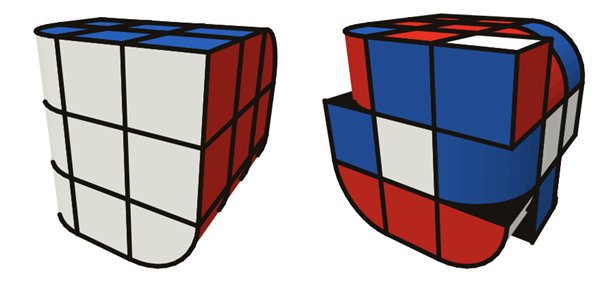
The Penrose Cube is a 3x3x3 shape and sticker mod with only three colours. Each colour covers two neighbouring faces, and the edge where those two faces meet is rounded off, so the colour flows smoothly around the corner of the cube. In this simulator white covers the front and left faces, blue the top and back, and red the right and bottom, giving three rounded edges that never touch each other. Commercial versions include the Z-Cubes and CubeStyle Penrose 3x3, both built on a standard 3x3 mechanism.
How it differs from a Rubik's Cube
The moves are the same, but two things change. First, like many 3x3 shape mods the cube shape-shifts: as soon as you turn a layer, pieces from a rounded edge end up next to sharp ones and the smooth shell breaks apart, so you have to restore the shape as well as the colours. Second, with three colours spread over six faces many pieces look alike. The retailer of the Z-Cubes version points out that the limited colours and identical-looking pieces introduce extra parities, cases where the last layer seems to need a move your usual algorithms do not provide. In practice the shape is your friend: a piece that matches by colour but sits in the wrong slot will usually stick out.
Practising on the simulator
- Drag any piece to turn its layer, and drag the background (or use the right mouse button) to orbit the puzzle.
- The keys U E D R L F B M S turn layers, and Shift reverses the direction.
- Scramble, Undo and Reset sit above the timer. The Start/Stop button or the Space bar runs the clock; a scramble resets it but does not start it.
- Paste a scramble or algorithm in standard 3x3 notation and press Apply, or load it into the step-by-step player under the cube. Demos such as the Sune and the T-Perm show how familiar algorithms look on this shell.
- A shareable link stores your scramble and algorithm, and the embed code lets you add the puzzle to another page.
Solving approach
Start with a 3x3 method you know, for example the beginner's method, but treat the three rounded edges as landmarks. Begin by placing one rounded edge between its two matching faces: it is the easiest piece to recognise and gives you a fixed reference. Then build the rest of the first layer by matching both colour and outline. In the last layer, check each piece's shape before you trust its colour, because two pieces of the same colours can belong in different slots. The simulator only reports the puzzle as solved when the whole shell is smooth again with one colour per region, so it is a reliable judge while you learn. Interestingly, because the shell looks the same after a 120-degree turn around the corner-to-corner diagonal, a position that is the solved shape rotated that way also counts as solved.
If you like this kind of colour puzzle, the Globe puzzle has a three-colour mode with the same pairs of faces on a sphere.
Is the Penrose Cube harder than a normal 3x3?
A little. The algorithms are the same, but having fewer colours makes pieces harder to identify and can produce parity-like last-layer cases.
Does the Penrose Cube change shape?
Yes. Turning any layer moves rounded edge pieces out of line, so a scrambled Penrose Cube is no longer smooth. Restoring the shape is part of the solve.
Which notation does the simulator use?
Standard Rubik's Cube notation: face turns, slices M E S, wide moves and x y z rotations, as described in the notation notes above.