- 2x2x2 pocket cube
- 3x3x3 Rubik's Cube
- 4x4x4 Rubik's Revenge
- 5x5x5 Professor's Cube
- Big Cube
- Picture Cube
- Ghost Cube
- 3x3x3 Cube Heads
- Mirror Cube
- Fisher Cube
- Axis Cube
- Mastermorphix
- Windmill Cube
- Pandora Cube
- Penrose Cube
- Globe puzzle
- Bandaged Cube
- Siamese Cube
- Void Cube
- Mixup Cube
- QJ Dodecahedron
- Floppy Cube
- 2x2x3 tower cube
- 2x2x4 tower cube
- Domino Cube
- 3x3x4 cuboid
- Square-1
- Pyramorphix
- Pyraminx
- Helicopter Cube
- Curvy Copter
- Clover Cube
- Skewb
- Skewb Ultimate
- Ivy Cube
- Rex Cube
- Dino Cube
- Redi Cube
- Face-Turning Octahedron
- Kilominx
- Master Kilominx
- Megaminx
- Pyraminx Crystal
- Starminx
- Rubik's Clock
- 4D Rubik's Cube
- Hungarian Rings
- Sliding 15 Puzzle
- Embed widgets
Algorithm notation. A 4D twist is written the way the simulator prints it: CELL:FROM>TO turns the cell named CELL (R L U D F B O I, with O and I the outer and inner cells) so that its FROM side lands on its TO side, for example R:U>F; FROM and TO are two different axes, neither of them the cell's own. A bare letter is the key-press spin, so R is the same as pressing R, R' as Shift+R and R2 as pressing it twice. An apostrophe inverts any twist and 2 doubles it; brackets repeat or invert a group: (R:U>F O:R>U)x3 or (R:U>F O:R>U)3 plays the pair three times and (R U)' plays its inverse. The second input loads an algorithm into the player under the puzzle, played on the puzzle as it stands (set up a scramble with the first input): step through it with the buttons, press play, or click a move to jump there.
Online 4D Rubik's Cube Simulator
Free 4D Rubik's Cube simulator: twist a 3x3x3x3 hypercube with all 8 cells and 216 stickers in view, scramble, time solves and step through algorithms.
4D Rubik's Cube Simulator: Solve a 3x3x3x3 Hypercube
The 4D Rubik's Cube, or 3x3x3x3, is what the familiar cube becomes in four dimensions. An ordinary cube has six square faces; its 4D cousin, the tesseract, has eight cubic cells. Each cell is a 3x3x3 block of stickers, so the puzzle has 216 stickers on 80 pieces: 8 one-colour centres, 24 two-colour pieces, 32 three-colour pieces and 16 four-colour corners. It has roughly 1.76 × 10^120 positions, compared with about 4.3 × 10^19 for the 3D cube.
No physical toy works quite like it, so it lives in software. Don Hatch and Melinda Green started their MagicCube4D program in 1988; Hatch and Jay Berkenbilt were the first to solve it, using macros (stored algorithms), and Roice Nelson was the first to solve it without macros. This 4D Rubik's Cube simulator uses the same kind of view, running directly in the browser.
Reading the projection
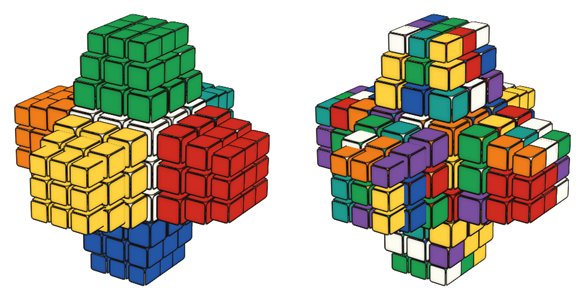
The big cube in the middle is the O (outer) cell, the one nearest to you in the fourth dimension. The six cells R, L, U, D, F and B are drawn as tapered blocks glued to its faces, and the I (inner) cell, which would be hidden behind everything, floats beside the projection so that all 216 stickers stay visible. A twist turns one whole cell, and moves that involve the fourth dimension stream stickers between the outer cells and the O and I cells.
Controls
- Drag any sticker toward where it should go and its cell turns to follow. Drag the background to orbit the view.
- Click a sticker to swing it toward the middle O cell; Shift-click swings it back. On the O and I cells a click swings the sticker to the top.
- Keys U, R, F, D, L, B (named as in standard cube notation), O and I spin a whole cell (Shift reverses it), and Z undoes.
- Scramble mixes the hypercube, Undo steps back and Reset restores it. Scramble resets the timer but does not start it; use Start or the Space bar.
- Algorithms can be applied at once or loaded into the step-by-step player, and the link and embed boxes save a scramble and algorithm as a URL.
How to start solving
Learn the 3D cube first: if you can solve a 3x3x3 Rubik's Cube, you already know most of the ideas, because commutators and setup moves work the same way in 4D. A typical approach is to solve the pieces in stages, much like a layer method, and to handle the last pieces with commutators. Spend some time with the demo algorithms under the notation notes: the R U R' U' demo uses cell spins you already know from 3D, while R:U>O U:R>O R:O>U U:O>R is a commutator through the O cell that shows what a true 4D move does. Before a full solve, try small goals such as fixing one 2-colour piece without disturbing the rest, then undo and repeat.
Is the 4D Rubik's Cube much harder than the 3D cube?
Mostly it is longer and harder to visualise rather than conceptually new. A full solve needs many more moves and a lot of patience, but no special mathematics.
Do I need special software to play?
No. This simulator runs in a modern browser on desktop or mobile, with nothing to install.