- 2x2x2 pocket cube
- 3x3x3 Rubik's Cube
- 4x4x4 Rubik's Revenge
- 5x5x5 Professor's Cube
- Big Cube
- Picture Cube
- Ghost Cube
- 3x3x3 Cube Heads
- Mirror Cube
- Fisher Cube
- Axis Cube
- Mastermorphix
- Windmill Cube
- Pandora Cube
- Penrose Cube
- Globe puzzle
- Bandaged Cube
- Siamese Cube
- Void Cube
- Mixup Cube
- QJ Dodecahedron
- Floppy Cube
- 2x2x3 tower cube
- 2x2x4 tower cube
- Domino Cube
- 3x3x4 cuboid
- Square-1
- Pyramorphix
- Pyraminx
- Helicopter Cube
- Curvy Copter
- Clover Cube
- Skewb
- Skewb Ultimate
- Ivy Cube
- Rex Cube
- Dino Cube
- Redi Cube
- Face-Turning Octahedron
- Kilominx
- Master Kilominx
- Megaminx
- Pyraminx Crystal
- Starminx
- Rubik's Clock
- 4D Rubik's Cube
- Hungarian Rings
- Sliding 15 Puzzle
- Embed widgets
Algorithm notation. The pocket cube uses the six face moves of standard Rubik's Cube notation: U D L R F B turn the up, down, left, right, front and back face a quarter turn clockwise as you look at that face, an apostrophe (R') turns it counter-clockwise and a 2 (R2) turns it 180 degrees. There are no slice moves on a 2x2x2, so a wide move such as Rw turns both layers and is the same as the x rotation; x y z rotate the whole cube. Brackets repeat or invert a group: (R U R' U')x3 or (R U R' U')3 plays the trigger three times and (R U)' plays its inverse. The second input loads an algorithm into the player under the cube, played on the cube as it stands (set up a scramble with the first input): step through it with the buttons, press play, or click a move to jump there.
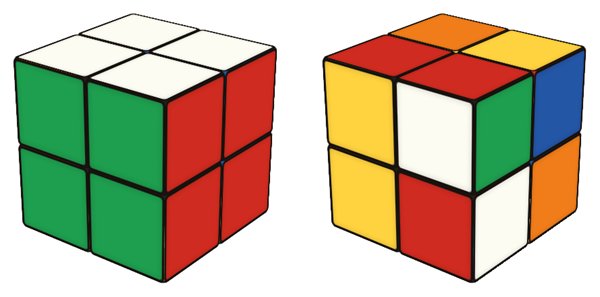
Online 2x2 Cube Simulator
Free 2x2 cube simulator: turn a 3D pocket cube in your browser, scramble, time your solves and step through algorithms move by move. Tips to solve it.
2x2 cube simulator: the pocket cube online
The 2x2x2, usually called the pocket cube or simply the 2x2, is the smallest real Rubik's-type cube. The puzzle was invented in 1970 by the American puzzle designer Larry D. Nichols, before the 3x3x3 existed. It has only eight pieces, all of them corners: there are no edges and no centres to give you a reference colour. That makes it a great first puzzle and a fast one to practise, because it has 3,674,160 positions and any of them can be solved in at most 11 moves (14 if you only count quarter turns).
Using the 2x2 simulator
- Turn and look around: drag a sticker to turn its layer, drag the background to orbit the cube. On a touch screen the same works with a swipe.
- Keyboard: U R F D L B turn the faces clockwise, Shift turns them counter-clockwise, and X Y Z rotate the whole cube.
- Scramble, Undo, Reset: Scramble mixes the cube with a random sequence, Undo takes back a move and Reset gives you a solved cube again. The status line counts your moves and tells you when the cube is solved.
- Timer: Scramble sets the clock to zero without starting it. Inspect the cube, press Space (or the Start button) to start and Space again to stop.
- Algorithms: the first input plays any sequence on the cube; the second loads an algorithm into the player below, where you can step through it move by move. The demo algorithms under this text drop straight into the input with one click.
How to solve the 2x2
Because the pocket cube has no centres, the first thing to learn is to pick a colour and build that face around one corner, checking that the side colours of the four pieces also match. The Ruwix 2x2 beginner's solution then needs just two more steps: position the yellow corners, then orient them. If you already solve a 3x3 with the layer-by-layer method, you will recognise the corner algorithms, since a 2x2 is a 3x3 without its edges and centres.
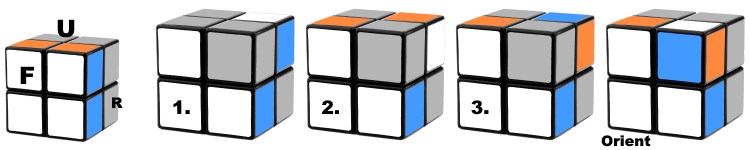
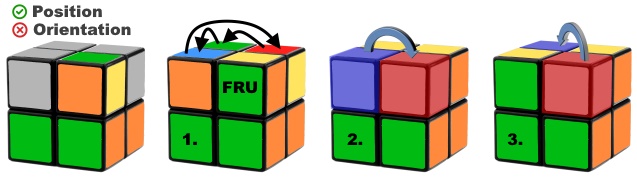
A good way to practise each step here: set up the case with the first input, load the algorithm into the player and step through it slowly while you watch where each corner goes. Then Undo back and do it yourself. When the beginner steps feel automatic, turn on the timer and do a few solves in a row; on a 2x2 the time you lose is mostly in recognising the case, not in turning. If a scramble ever leaves you stuck, the online 2x2 solver can show you a way out.
Moving on to faster methods
Faster 2x2 methods still start with one face or one layer, but finish in fewer looks. The Ortega method builds a face, orients the last layer and then permutes both layers, using 12 algorithms in total. CLL solves the whole last layer in one step after the first layer, with 42 algorithms, and EG builds only a face, like Ortega, then solves everything else in one step with 128 algorithms (the 42 CLL cases among them). The algorithm player is handy for drilling such sets: paste a case, play it at speed, then reverse it with brackets, for example (R U R' U R U2 R')'.
Is the 2x2 easier than the 3x3?
Yes, for most people. There are fewer pieces, fewer steps and far fewer positions, so the 2x2 is often the first puzzle beginners solve on their own. Lacking centres makes it slightly confusing at first, because you have to decide which colour goes where.
Does this simulator use a different notation for the 2x2?
No, it uses standard Rubik's Cube notation. There are no slice moves on a 2x2, so a wide move such as Rw turns the whole cube, exactly like an x rotation.
Can I switch to a 3x3?
Yes, either with the size menus above the cube or on the full Rubik's Cube simulator. If you want a step up that still feels familiar, the 2x2x3 tower cube adds one middle layer to the pocket cube.