- 2x2x2 pocket cube
- 3x3x3 Rubik's Cube
- 4x4x4 Rubik's Revenge
- 5x5x5 Professor's Cube
- Big Cube
- Picture Cube
- Ghost Cube
- 3x3x3 Cube Heads
- Mirror Cube
- Fisher Cube
- Axis Cube
- Mastermorphix
- Windmill Cube
- Pandora Cube
- Penrose Cube
- Globe puzzle
- Bandaged Cube
- Siamese Cube
- Void Cube
- Mixup Cube
- QJ Dodecahedron
- Floppy Cube
- 2x2x3 tower cube
- 2x2x4 tower cube
- Domino Cube
- 3x3x4 cuboid
- Square-1
- Pyramorphix
- Pyraminx
- Helicopter Cube
- Curvy Copter
- Clover Cube
- Skewb
- Skewb Ultimate
- Ivy Cube
- Rex Cube
- Dino Cube
- Redi Cube
- Face-Turning Octahedron
- Kilominx
- Master Kilominx
- Megaminx
- Pyraminx Crystal
- Starminx
- Rubik's Clock
- 4D Rubik's Cube
- Hungarian Rings
- Sliding 15 Puzzle
- Embed widgets
Algorithm notation. The Redi Cube turns at its corners, so its notation names corners rather than faces. A move is named by the three faces that meet at the corner it turns: URF, URB, ULF, ULB, DRF, DRB, DLF and DLB. A plain name turns that corner 120 degrees clockwise as you look at it, a prime (URF') turns it counter-clockwise, and URF2 is the same as URF'. The letters can come in any order, so RUF equals URF, and the digits 1 to 8 name the same corners as the keyboard. Brackets repeat or invert a group: (URF ULB')x3 or (URF ULB')3 plays it three times and (URF ULB)' plays its inverse. The second input loads an algorithm into the player under the cube, played on the cube as it stands (set up a scramble with the first input): step through it with the buttons, press play, or click a move to jump there.
Online Redi Cube Simulator
Free Redi Cube simulator in 3D: twist Oskar van Deventer's corner-turning cube, scramble, time your solves and step through algorithms in your browser.
Redi Cube Simulator: Corner Twists Without Centres
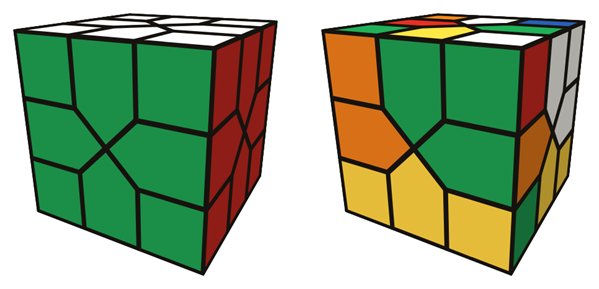
The Redi Cube was designed by Oskar van Deventer in 2009 and has been mass-produced by MoYu since 2017. It works like a Dino Cube with extra corner pieces: the cube has 8 corners and 12 edges and no centre pieces, and each 120-degree twist turns one corner together with the three edges around it. It is not an official WCA event, but it is a popular puzzle for anyone who enjoys corner-turning cubes.
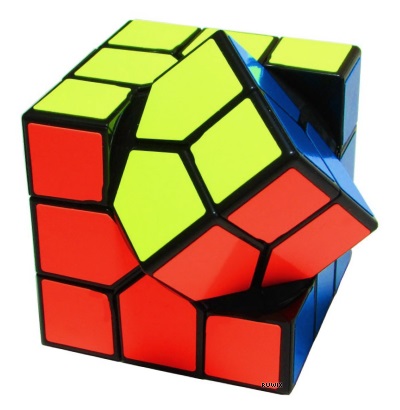
This Redi Cube simulator lets you learn the puzzle, test sequences and time casual solves in a browser.
How the controls work
- Drag a corner square to twist its corner, or drag an edge toward where you want it to go. Drag the background to orbit and see the far side.
- The digits 1 to 8 turn the eight corners clockwise; with Shift they turn counter-clockwise.
- Scramble mixes the cube with an animated random sequence, Undo steps back one move and Reset returns to solved.
- The timer is reset by Scramble but not started: press Start or the Space bar when you are ready, and again when you finish.
- The algorithm input applies a sequence such as
URF ULB'at once, while the player under the cube lets you step through one twist at a time or click a move to jump there. Try the demo algorithms under the notation notes. - The link and embed boxes turn a scramble and algorithm into a shareable URL or iframe code.
A beginner method
The Redi Cube can be solved by intuition, and experienced cubers often manage without any algorithms. The Ruwix Redi Cube tutorial follows a layer-by-layer plan:
- First layer corners: twist the four white corners so they all show white on top.
- First layer edges: slot the edges between them; the last one needs a short four-move sequence.
- Middle layer: turn white to the bottom, orient the yellow corners upward and insert the four middle edges.
- Last layer: cycle the remaining edges into place with three-edge cycles.
Corners are the anchors here: once they are twisted the right way, edges can be moved around them without breaking much. If you get stuck on the last edges, load a cycle into the player and step through it slowly to see which three edges it moves and in which direction.
What is the difference between the Redi Cube and the Dino Cube?
The Dino Cube has only the 12 edges, and its turning corners are hidden. The Redi Cube adds 8 visible corner pieces that turn with the edges, so there is one more piece type to solve, but the corners also give you a clear reference for where each colour belongs.
Is the Redi Cube hard?
Not very. The moves are easy to follow and the whole solve can be worked out with intuition and a few short sequences. It is a natural next puzzle after the Dino Cube.