- 2x2x2 pocket cube
- 3x3x3 Rubik's Cube
- 4x4x4 Rubik's Revenge
- 5x5x5 Professor's Cube
- Big Cube
- Picture Cube
- Ghost Cube
- 3x3x3 Cube Heads
- Mirror Cube
- Fisher Cube
- Axis Cube
- Mastermorphix
- Windmill Cube
- Pandora Cube
- Penrose Cube
- Globe puzzle
- Bandaged Cube
- Siamese Cube
- Void Cube
- Mixup Cube
- QJ Dodecahedron
- Floppy Cube
- 2x2x3 tower cube
- 2x2x4 tower cube
- Domino Cube
- 3x3x4 cuboid
- Square-1
- Pyramorphix
- Pyraminx
- Helicopter Cube
- Curvy Copter
- Clover Cube
- Skewb
- Skewb Ultimate
- Ivy Cube
- Rex Cube
- Dino Cube
- Redi Cube
- Face-Turning Octahedron
- Kilominx
- Master Kilominx
- Megaminx
- Pyraminx Crystal
- Starminx
- Rubik's Clock
- 4D Rubik's Cube
- Hungarian Rings
- Sliding 15 Puzzle
- Embed widgets
Algorithm notation. The Pandora Cube is a 3x3x3 with a reshaped surface, so the input reads standard Rubik's Cube notation. U D L R F B turn the up, down, left, right, front and back face a quarter turn clockwise as you look at that face; an apostrophe (R') turns it counter-clockwise and a 2 (R2) turns it 180 degrees. M E S are the middle slices (M follows L, E follows D, S follows F), a w or a lowercase letter (Rw or r) turns two layers together, and x y z rotate the whole puzzle. A group in brackets repeats or inverts: (R U R' U')x3 or (R U R' U')3 plays the trigger three times and (R U)' plays its inverse. The second input loads an algorithm into the player under the cube, played on the cube as it stands (set up a scramble with the first input): step through it with the buttons, press play, or click a move to jump there.
Online Pandora Cube Simulator
Free Pandora Cube simulator: turn the gem-cut 3x3 shape mod with big centres, sunken edges and pointed corners in 3-D, then time solves and test algorithms.
Pandora Cube Simulator: a 3x3 in a Gem-Cut Shell
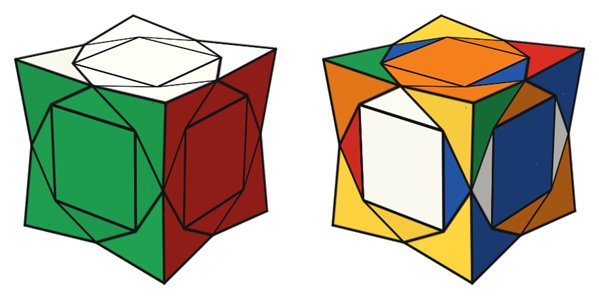
The Pandora Cube is a 3x3x3 shape mod sold under MoYu's MFJS (MoFangJiaoShi) brand. Retailers describe it as a 3x3 with overhanging corners, collapsed edges and enlarged centres: the centre squares are raised and oversized, every edge piece sinks to a small triangle on each face, and the corners rise into pointed pyramids that overhang their neighbours. Inside is a completely ordinary 3x3x3 mechanism, so it turns and solves exactly like a Rubik's Cube.
How it differs from a normal 3x3
Unlike many shape mods, the Pandora Cube never changes shape. Each sculpted piece has the same symmetry as the slot it sits in, so after any turn the outline stays the same and only the colours scramble. That also means there is no centre orientation to worry about. What does change is how the cube looks: the stickers are no longer a neat 3x3 grid, so pieces you would recognise at a glance on a normal cube take a moment longer to find. Edges show only a narrow triangle of each colour, while corners show large faceted areas, and that shift in proportions is what trips people up.
Using the simulator for practice
- Drag a facet to turn its layer and drag the empty background to orbit the cube. U D L R F B and M E S on the keyboard turn layers, X Y Z rotate the whole cube and Shift reverses a turn.
- Scramble gives you a random position, Undo takes back your moves and Reset restores the solved cube.
- Start the timer with the Start/Stop button or the Space bar. A scramble resets the clock without starting it, so inspection is up to you.
- The algorithm input applies any sequence in standard notation, and the player under the cube steps through an algorithm one move at a time. The example list includes the Sune, a T-Perm and a checkerboard pattern that looks particularly striking on this shell.
- Copy the link to share a scramble, or use the embed code to place the simulator on your own site.
Solving tips
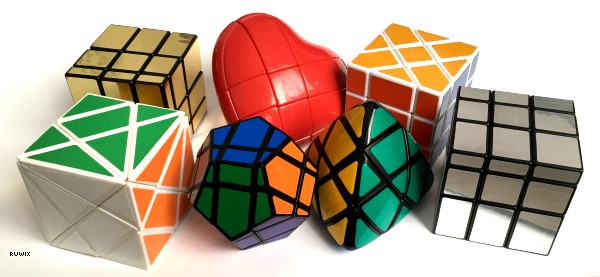
Any 3x3 method works unchanged, from the beginner's method to CFOP. The practical skill to train is recognition. Find edges by their two small triangles rather than by area, and judge a corner by the colours on its three pyramid faces. When you build the cross, look along the cube edges, where the sunken edge pieces sit, instead of at the face centres. A good exercise is to apply a known algorithm such as the T-Perm from the examples and watch which pieces move: once you can follow it on the Pandora shell, last-layer recognition becomes easy. To see how other shells distort a 3x3, compare it with the shape-shifting Mirror Cube or browse the 3x3 shape mods overview.
Is the Pandora Cube harder than a Rubik's Cube?
Not in terms of moves or algorithms, which are identical. Reviewers note that it turns and solves exactly like a regular 3x3; the only new challenge is reading the unusual piece shapes quickly.
Does the Pandora Cube change shape when scrambled?
No. Every piece fits its slot in any orientation, so the outline is the same in every position and only the colours move.
Can I use standard notation here?
Yes. The simulator reads ordinary 3x3 notation, including slices, wide moves, rotations and repeated groups, as explained in the notes above.